
Repeating and Recurring Events
Looking for something specific? Skip ahead:
In addition to standalone events, users can (depending on their role) create either repeating or recurring events.
These repeating and recurring events allow hosts to organize things like: monthly meetings, weekly phonebanks, monthly movie nights, weekly lobby days, etc. The tools are flexible to ensure that your hosts are able to host any sort of event they're interested in leading.
Repeating and recurring events are similar but they do have some key differences: who has access to the tools and how automatically the events are created.
Before getting into the details, here's an overview of repeating vs. recurring events:
|
|
Repeating Events |
Recurring Events |
|---|---|---|
|
Who can create them? |
Regular (non-admin, non-group organizer, non-partner admin) hosts |
Org admins, approved group organizers, and partner admins† |
|
How many events are created initially? |
One |
Up to six |
|
What happens after the first event? |
The host will receive an email asking if they'd like to create the next event. They can then submit a blast email to invite their previous attendees to RSVP to the newly created event. | The next event in the series is already created and active. Attendees of the first event will automatically receive an email inviting them to the next event. |
| How are subsequent events in the series created? | The host needs to manually create each event in the series. They'll be brought to a special event creation form with information about the last event prefilled. | Events are created in batches. As the first batch comes to an end, the host will be emailed and asked to create the next batch of events. After clicking the link in the email, the next set of events will be created automatically. |
| How are the events connected to one another? | On the event's admin > Details page, it will reflect that the event is part of a repeating series and link back to predecessor event. |
The event series has a publicly visible landing page that's linked on the event's RSVP page (as long as the events are not unlisted). The series also has a dedicated management for admins. If the series is hosted by a group, there's a management page for group organizers. |
† Recurring events are only available to admins of partnerships that with the Auto-approve admin-created campaigns setting enabled. For partnerships that require moderation for admin-created content, the admins will only have the repeating event option.
Repeating Events
Repeating events can be thought of as a light version of recurring events. With repeating events, only one event is created at a time, but the host is automatically prompted via email to create the next event in the series. Repeating events can be created by any user without special permissions on the platform (e.g. not an org admin and not a group organizer). The option to repeat an event is shown at the bottom of the normal event creation form.
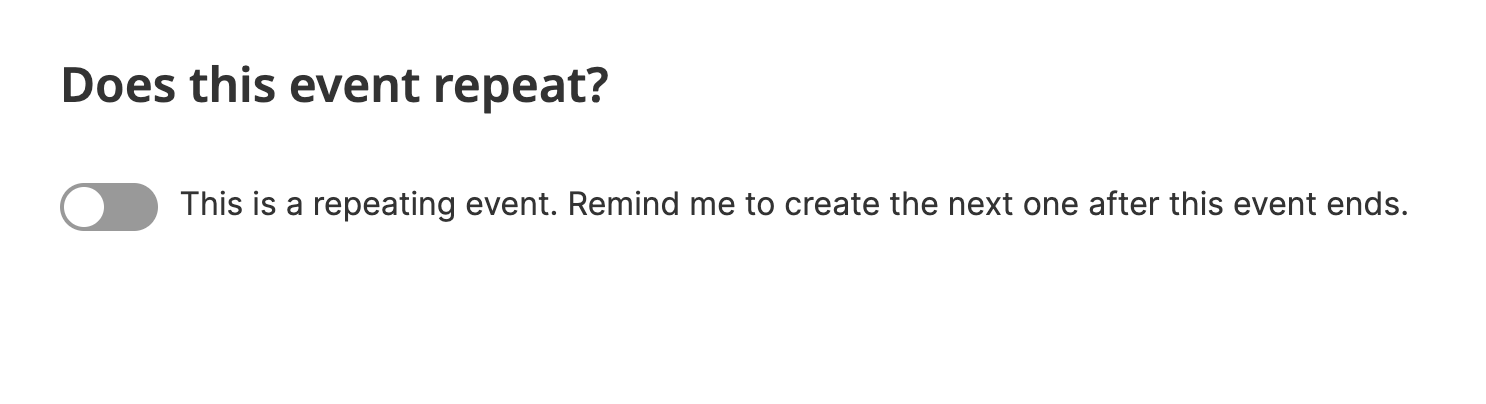
For events marked as repeating, we'll send an automatic prompt to create the next event immediately after the already-scheduled event ends (or two hours after the event's start time if no end time is set by the host).

If the host clicks the link in the email, they'll be brought to the new event form, with details pre-filled based on the previous event they created. In particular, the following information will be copied to the new event:
- title and description
- location, including unconfirmed status, private status, and/or additional location details
- start and end times
- attendee limit
- web conference URL
- cohosts (who will also be granted host-level access to the new event)
If needed, the host can edit any of the pre-filled event details. After creating their new event (which will require moderation) the host will also be prompted to invite their previous event's attendees to the new event. Clicking the button in the banner will bring them to their previous event's Email Supporters page. Any promotional email will need to be approved by admins.

We'll continue to prompt the host to create new versions of the event as the already-scheduled versions end. Because each event needs to be manually created, we can ensure that the host is still active and engaging with their event. Also, because these events can be created by any user, the manual creation process ensures that they're still sent through the moderation queue for approval.
Recurring Events
Creating Recurring Events
The Recurring Events feature is limited to user accounts with more advanced permissions. It's available to local group organizers, organization admins, and partner admins.
Note: Partner admins will have access to recurring events based on their partnership's settings. For the recurring events option, the partnership must have the Auto-approve admin-created campaigns setting enabled. This can be updated by going to the org admin homepage > Partnerships > name of the partnership > Settings > Campaign Creation > Auto-approve admin-created campaigns.
Like repeating events, recurring events can be used for things like: monthly meetings, weekly lobby days, weekly trivia nights, etc.
Recurring events are created in batches – with weekly events created 6 at a time and monthly events created 3 at a time. Batches ensure that users searching for events aren't overwhelmed by hundreds of the same event in their search results. It also ensures that lists do not include orphaned events (e.g. events that have been auto-created even though the host is no longer active and engaging with the event).
Group organizers can set up a recurring event by going to the group's normal event creation page (the local group's main page > Add Event. Partner admins can create recurring events by going to the partnership hub page > Organize Events > New Event. Org admins can set up a recurring event by going to any event creation form.
At the bottom of the form, is a toggle to make this a recurring event.

The recurrence options available on this page will update based on the details already entered by the event host.
When the host clicks to publish their new event, the first batch of events will be created immediately. We'll also schedule the email that will prompt the host to create additional events in the series.
Each event in the recurring series will have its own event RSVP page. These pages will look mostly the same as all other events on the platform, but will include a badge denoting that they're a recurring event and have a link to see all upcoming dates in the event series.
Note: If you're not seeing a link to upcoming dates on the RSVP page of a recurring event, it might be that there are no upcoming events scheduled (in which case you can schedule the next batch if you'd like) or the group the event belongs to may be unlisted (in which case the events are unlisted too, though you can change that if you'd like).


May Event Image by Nikola Jovanovic on Unsplash
June Event Image by Luca Bravo on Unsplash
July Event Image by Fred Moon on Unsplash
These events will also be shown in the group's event list (if the series is tied to a group) and on public listing pages (unless the events are unlisted).
Attendees of a recurring event will receive an automatic email inviting them to attend the next event in the series.
Managing recurring events as a group organizer
Local group organizers (and org admins) can manage their group's recurring events by going to the group page > Settings > Group Settings > Recurring Events.

From the recurring series page, organizers can view upcoming events and edit event details. This includes changing the title, description, location, start and end times, recurrence pattern, attendee limit, and event image for all events in the series. From this page, organizers can also cancel an event series.
Note: if the the recurrence pattern for an event series is changed, we'll cancel the current series and create a new one with the same settings.
When an event series has a limited number of upcoming events remaining, group organizers will be asked if they want to create the next batch of events in the series. Regularly prompting the organizers to create the next batch of events allows us to ensure that event lists aren't overwhelmed by hundreds of the same event and that there are not 'orphaned' events hosted by users who are no longer actively engaged.

Any group organizer can click to extend the series and we'll then create the next batch of events in the background. These events will be automatically added to public lookup pages (if the group is not unlisted).
Once the series is eligible for renewal, group organizers will also see the prompt to create the next batch of events on the series management page.
Managing recurring events as a partner admin
Partner admins (and org admins) can manage their partnership's recurring event series by going to the partnership page > Organize Events > Event Series.

From the recurring series page, partner admins can view upcoming events and edit event details. This includes changing the title, description, location, start and end times, recurrence pattern, attendee limit, and event image for all events in the series. From this page, organizers can also cancel an event series.
Note: if the the recurrence pattern for an event series is changed, we'll cancel the current series and create a new one with the same settings.
When an event series has a limited number of upcoming events remaining, partner admins will be asked if they want to create the next batch of events in the series. Regularly prompting partner admins to create the next batch of events allows us to ensure that event lists aren't overwhelmed by hundreds of the same event and that there are not 'orphaned' events hosted by users who are no longer actively engaged.
Any partner admin can click to extend the series and we'll then create the next batch of events in the background. These events will be automatically added to public lookup pages.
Once the series is eligible for renewal, partner admins will also see the prompt to create the next batch of events on the series management page.
Managing recurring events as a an org admin
Organization administrators can use the same management page as group organizers, but they also have their own administrative pages for all events in a series. Admins can view their organization's recurring event series by going to the org admin homepage > Events > Event Series.
Note: you don't need to go to the Event Series page to create a new recurring event. Just go to the normal event creation page and toggle the recurring option at the bottom of the page.
By default the event series page will be filtered to only show active event series. If you need to see past or dormant series, you can update the page's filters to include those series.
From this page, you can click the name of the series to go to the series' public lookup page.
May Event Image by Nikola Jovanovic on Unsplash
June Event Image by Luca Bravo on Unsplash
July Event Image by Fred Moon on Unsplash
Admin settings for recurring events
From the admin Event Series page, you can also click the Admin button to go to that series' admin-only page.

On the Details page, you'll see basic information about the series, including:
- the host of the events (and if it's associated with a local group)
- the name of the series, which can be edited
- the events' recurrence pattern, which can be edited
- the option of canceling the series
Clicking to the Events Settings page allows additional options for admins. When updating any of these settings, you'll be asked if the changes should apply to newly created events only or existing upcoming events.
Note: When updating a series' settings and applying the settings to upcoming events, we will not update that piece of information for any event where it's already been overridden.
For example: the default start time for events in the series is 11am, and it has upcoming events A, B and C. Event C was previously updated to start at 1pm. If the start time in the series settings is updated to 10am and the changes are applied to upcoming events, we will update events A and B to start at 10am. Event C will be unchanged and its start time will remain 1pm.
The settings that admins can update at the series level include:
- Title
- Description
- Start time
- Duration (thus setting a specific event end time)
- Shifts (configured by choosing how long after the event's start time each shift should be begin and how long each shift should last)
- Staff-led (should we use the staff-led theme and name settings for the events in the series)
- Campaigner contactable (should members of the public be able to send messages to the event hosts)
- Web conference URL
- Image
- Language
- Calendar (should these events be automatically assigned to a specific calendar)
- Theme (choose the fonts/colors/logos/links we should use when showing the event RSVP pages)
- Host
- Host name override
- Visibility (should the events be visible, invisible, or featured on event lists)
- Social sharing (should site visitors and attendees be prompted to share the events on social media)
- Social share image (the image should be used when sharing the events on social media)
- Custom fields (custom fields added to the RSVP forms of all events in the series)
- Location
- Recurrence pattern
Note: Changing the recurrence pattern with cancel the current recurrence and create a new one with the same settings as before but with the new recurrence pattern. You can also decide whether or not to cancel the rest of the series' upcoming events.